How to change battery in APC ES 500, BE500-UK
Change the battery in a APC Back-UPS ES 500, BE550-UK- How to change battery APC ES 500
- How to change battery APC BE550-UK
you need not be afraid of changing the battery in your APC ES500 Back-UPS unit protecting your equipment, it's very easy, you need no tools and no special skills, we would think anybody is capable of such a task if pushed, of course the prospect of saving money will be a sufficient lure to most people to most people to try just a simple task.
After you have ordered your battery pack from us and received, unpack it, you will see a single battery, it may have two plastic terminal covers, these are to be removed before fitting on the APC ES500 surge protected unit. Before you start the procedure below, make sure you have a clear desk or somewhere you can lay a soft cloth down to protect the casing of the UPS system.
Change the battery in your APC ES500 Back-UPS
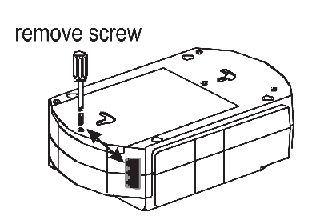
Step 1; Before you start messing about with any equipment you need to make it safe, so power down anything your APC ES 500, BE400-UK back-UPS is protecting, then power down the UPS itself and remove any cables and the most important thing is to remove the wall sockets from the mains, you do not need any shocks
Once you have done the above lift up your Unit and place upside down on the area you have kept aside with a soft cloth to work on, you will probably see a screw holding on the door, remove this.
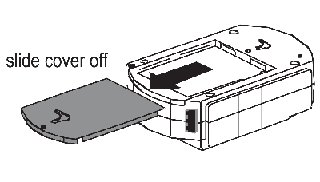
Step 2; You will then be able to slide back the battery door cover to expose the battery pack below
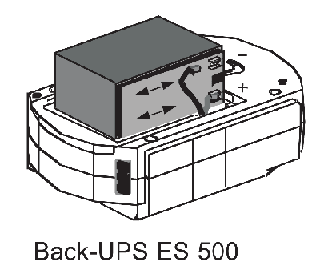
Step 3; You can then pull out the battery, you will see the wires that will need to be put on to the new batteries, they should be self explanatory but you can always take a picture at this stage with your mobile phone so you have a reference
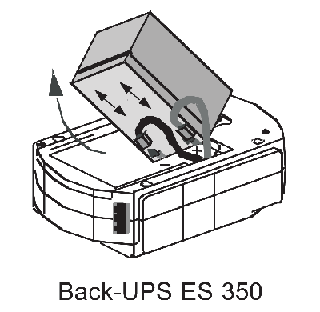
Step 4; It may be easier to turn the unit over to get the battery out, be careful though the battery is quite heavy, then just swap the leads over to the new battery and put back in, making sure you do not trap the cables while doing so
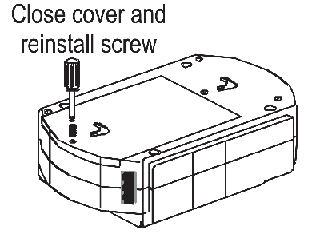
Step 4; Then all you need to do is replace the cover and the retaining screw if you had one in your particular system
We always state that it's better to charge your new battery in the UPS before using it, this will help the system reset itself and know that it has a new battery, it will not take long as its probably already almost fully charged
Buy a APC ES 500, BE400-UK battery at a budget price
Buy a APC CS 500, BK500EI battery at a budget price
Buy a APC BK500 battery at a budget price
Back to how to install battery guides
Please note the following: This is just a guide, you should check you are ordering the correct battery, the code will be on the back side of the UPS, if you undertake to change the battery yourself it is your responsibility, not ours
Your old battery should be recycled, you will find links to a recycle bank very near you on the recycle page below, you should never dispose of in your normal domestic rubbish as it is a valuable resource which can be used able and does nobody any good rotting in landfill for many decades, please recycle, please think about the planet we live in
How to recycle your old battery